
Auto-Open Jupyter Notebooks in Colab
Overview
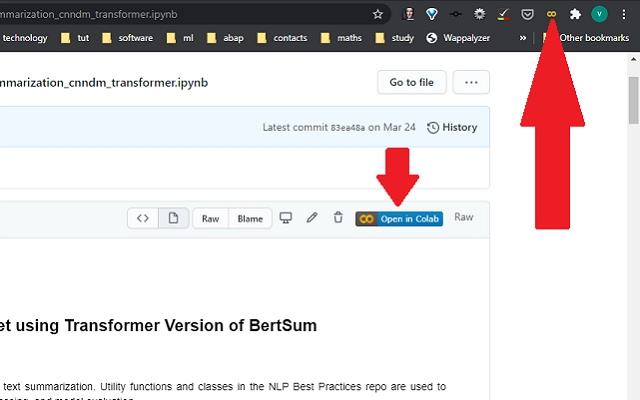
The software enables seamless integration between GitHub-hosted Jupyter notebooks and Google Colab. When a user opens a Jupyter notebook page on GitHub, the tool automatically adds an "Open in Colab" button, streamlining access to cloud-based computational environments. This functionality is particularly beneficial for data scientists, machine learning engineers, and researchers who frequently collaborate on code repositories. The tool eliminates the need for manual setup or configuration, allowing immediate execution of notebooks in a fully configured Google Colab environment.
Designed for professionals and academic users working with Python-based data workflows, the software enhances productivity by reducing friction between repository browsing and experimentation. Real-world usage scenarios include rapid prototyping, teaching technical concepts, sharing reproducible research, and collaborative coding sessions. The tool supports cross-platform access across Windows, Mac, and Linux, ensuring broad compatibility for diverse development teams. Since the developer did not provide additional background, the focus remains on the tool’s core functionality and its role in modern data science workflows.
Key Features & Capabilities
- Automatic Button Injection – Detects GitHub-hosted Jupyter notebooks and dynamically inserts an "Open in Colab" button directly into the page, enabling one-click access to cloud execution.
- Seamless Integration with Google Colab – Upon clicking the button, the notebook is loaded into Google Colab with pre-configured runtime settings, allowing immediate execution without local setup.
- Cross-Platform Compatibility – Functions consistently across Windows, Mac, and Linux systems through browser-based execution, ensuring uniform user experience regardless of operating system.
- Minimal User Intervention – Requires no installation or configuration; operates entirely within the browser environment, making it accessible to users with varying technical expertise.
- Enhanced Collaboration Workflow – Supports team-based development by enabling quick sharing and execution of notebooks, reducing setup time during code reviews or joint experiments.
For example, a data science educator can share a GitHub repository containing tutorial notebooks, and students can instantly run them in Colab without installing Python or Jupyter locally. Similarly, a research team can publish findings with executable code, allowing peers to reproduce results with a single click. The tool’s lightweight nature ensures fast loading and responsiveness, ideal for users managing multiple repositories or frequent notebook interactions.
User Interface, Workflow & Performance
The tool operates entirely within the browser environment, leveraging the existing GitHub interface without altering the core user experience. No additional UI elements are installed on the user’s device—instead, the "Open in Colab" button is injected directly into the GitHub page when a compatible notebook is detected. Navigation remains unchanged, and the workflow is intuitive: simply open a notebook on GitHub, click the new button, and transition to Colab.
Performance is influenced by browser capabilities and internet connectivity, as the tool relies on client-side JavaScript execution. The developer did not specify resource usage details, so exact CPU or RAM behavior cannot be confirmed. However, given the tool’s size of 1.2 MB and browser-based operation, it is expected to have minimal impact on system performance. Stability appears consistent with typical browser extensions, though no formal testing data was provided. The tool does not require background processes or persistent storage, reducing the risk of conflicts with other applications.
Compatibility & System Requirements
The software is compatible with Windows, Mac, and Linux operating systems, ensuring broad accessibility for users across different environments. It functions as a browser extension, meaning it operates within modern web browsers that support extension APIs. The installation size is 1.2 MB, which is relatively small and suitable for quick deployment.
Exact system requirements were not listed. Compatibility with specific browser versions or hardware specifications is limited to the standard capabilities of current web browsers. No additional dependencies or software installations are required beyond the browser environment. The tool does not interact with the operating system directly, relying solely on the browser’s rendering and scripting capabilities. Platform compatibility information is limited to the provided OS list.
Pros and Cons
Pros
- Enables instant access to Google Colab from GitHub notebooks with a single click
- Operates without installation or configuration, ideal for non-technical users
- Supports cross-platform use across Windows, Mac, and Linux
- Lightweight at only 1.2 MB, minimizing system impact
- Enhances collaboration by simplifying notebook sharing and execution
Cons
- No official developer information provided
- Dependent on browser functionality and internet connectivity
- Does not offer customization options for the button or workflow
- Performance may vary based on network speed and browser performance
- Functionality limited to GitHub-hosted notebooks; no support for other platforms
FAQ Section
Is this tool available for all browsers?
The tool is designed to work with modern web browsers that support extension APIs. Specific browser compatibility was not detailed, but it is expected to function on popular browsers such as Chrome, Firefox, and Edge.
Is the software secure to use?
As a browser extension that operates within the GitHub environment, the tool does not access personal data or files beyond the current page. It runs in a sandboxed environment and does not require permissions to access sensitive information. However, users should only install extensions from trusted sources.
How often are updates released?
Update frequency was not specified. Users should check the extension’s official page for release notes and version history.
Can I use this tool offline?
No, the tool requires an active internet connection to load GitHub pages and connect to Google Colab. Offline usage is not supported.
What license type does this tool use?
License details were not provided. The software is free to use, but the specific terms of use are not available in the current information.
Final Thoughts + CTA
This tool offers a streamlined solution for data scientists and developers working with Jupyter notebooks on GitHub. By automatically injecting an "Open in Colab" button, it removes barriers to experimentation and collaboration, enabling faster iteration and broader accessibility. Its lightweight design, cross-platform support, and zero-setup workflow make it a valuable addition to any data science toolkit. While the lack of developer information and customization options are notable limitations, the core functionality delivers significant value. For professionals seeking to enhance their workflow and share executable code effortlessly, this tool stands out as a practical and efficient utility.
Download Auto-Open Jupyter Notebooks in Colab now







